Simple way to write symbols in Notepad or MS-word

| July 11, 2008 | 10 Comments
email

If you are creating a document and you want to insert symbols, then how will you write it?  Many of may say using Insert menu and then symbols. But, you will have to search for that symbol and then do it. This trick is however not possible in Notepad files.

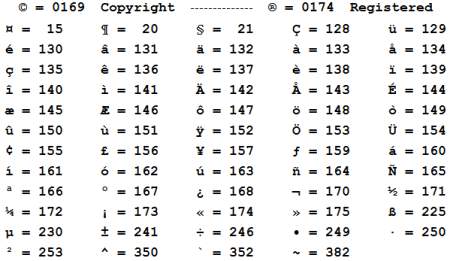
Here’s a simple way to write any symbol using shortcut keys, i.e. Alt key + calulator number = Symbol

List of commonly used symbols with values is given here. So, try it!

About the Author ()

Rohit Langde is editor-in-chief and owner of Blogsolute. He is Born-Geek and Technology Enthusiast. Being a blogger, he is also Mechanical Engineer who believes in simple Living. You can

Comments (10)

Trackback URL | Comments RSS Feed

  1. If you are writing a webpage, you can also use HTML to show those characters.

  2. Rohit says:

    Yep, I agree. But, If you are writing for presentation or desktop document purpose then, this is useful.

  3. ameo says:

    this is really good ,
    i didn’t knew how to do that in notepad ..
    i tried it and it does did a good work .

    p.s check on the image , it doesn’t work with me !

  4. Rohit says:

    @ ameo,
    Image is working now. Actually, I have lost all images in fact wp-content folder was deleted by mistake during upgrade to 2.6.1.

  5. Tona says:

    Always good quality info from this site!

  6. Traffic says:

    This is the way things should be, get off what we are on now

  7. Samantha says:

    Anybody know if I wanted to bookmark your blog do I have to set-up an account for Facebook?

  8. thats not working.. says:

    whenever i press alt the windows menu will pop up

    • Rohit says:

      @thats not working.., Are u mistaken with Alt and Windows button? OR do you have some software installed for that behavior?

  9. Roger Thomas says:

    Well researched site! Can you recommend any forums I could join to learn more? Thanks

Leave a Reply